| Other Manu |
 | |
 |
| Islamic Corner |
|
|
|
| Articles Corner |
| |
|
| Software Corner |
| |
|
| Women Corner |
| |
|
| Songs Corner |
| |
|
| Mobiles Corner |
| |
|
|
 |  |  |
 | Main » 2009 » July » 8 » TweakRAM 6.3.10.30
7:18 PM TweakRAM 6.3.10.30 |
TweakRAM
is a handy memory optimizer tool that will keep your computer running
faster and efficiently. It increases your system performance by making
more memory available for your applications and the operating system.
TweakRAM
defragments your computer's memory, increasing the efficiency of your
CPU and Motherboard caches, recovers memory leaks from poorly behaved
applications, flushes unused libraries temporarily out to disk and so
on. By all this optimization tricks your favorite applications and
games will run faster and efficiently even on old computers.
Using
this RAM optimizer utility your computer will achieve superior
performance. There is no need to buy additional expensive memory for
your computer. TweakRAM will defragment system memory for faster access
time. TweakRAM doesn't modify your system in any way and your system
will be even more stable with TweakRAM installed.
No matter how much physical memory you have, TweakRAM will help keep your computer running faster and efficiently.
Memory defragmantation
After
numerous launches of different programs your memory is messed up, that
is especially easy to see after the work of Internet Explorer. The
programs will still run, but the overall system performance will become
lower. You should know that your CPU has cache (L1, L2) and that
certain part of your RAM is written there right before the response to
the given region of memory.
When your CPU reads some
data/commands from cache it's much faster then reading/executing
orbitrary commands. Now imagine a situation when the program's code is
placed in many different places of your RAM, and that those parts
include multiple redirections(pointers) to another ones. How to cache
the stuff in such a case? Because of this it happens frequently that
wrong and useless data is cached, thus supplying your CPU with a nasty
job to find necessary peaces of code by itself. Such a reduction of
hit-rate of cache is able to decrease the efficiency of the system
regardless of memory size. Memory defragmentation solves this problem,
so that your CPU doesn't have to waste its time.
Unloading of Unnecessary Libraries
Many
programs including Windows used to load in memory many libraries and
that is evident that some of won't be used instantly. TweakRAM finds
such modules and unloads them to a swap file. If some of unloaded
libraries becomes necessary again it is loaded back in RAM.
Fighting with Memory Leaks
All
applications while running allocate certain amount of memory. But it
happens oftenly that after quiting the program not all of the allocated
space is set free. So the program ain't running any more, and you get
some memory that is not actually used and at the same time it can't be
allocated by some other program before it's set free. TweakRAM finds
and removes such memory leaks, thus increasing size of free RAM.
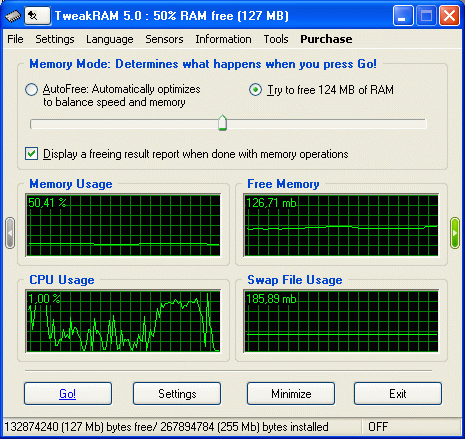
Information about Memory and CPU
The
program shows a detailed information about total size of physical RAM,
free memory and the per-centage of its usage by the system. The same
information is given about swap file and the business of the CPU.
Application Startup Wizard
Since
version 2.0 TweakRAM is supplied with it's Application Startup Wizard
which will help you configure optimal launch parameters of your
applications. Now TweakRAM will automatically free needed size of RAM
before/after program's launch.
download
|
|
Category: Software |
Views: 337 |
Added by: downloadshell
| Rating: 0.0/0 |
|  |
 |  |
 |  |  |
|
| Search Here |
|
|
|
| Our poll |
| |
|
| Donate Us |
| |
|
| Statistics |
|
Total online: 1 Guests: 1 Users: 0
|
|
| Latest Post |
| |
|
| My Archives |
| |
|
| informer |
| |
|
| Latest News |
| |
|
|