 [/center] [/center]
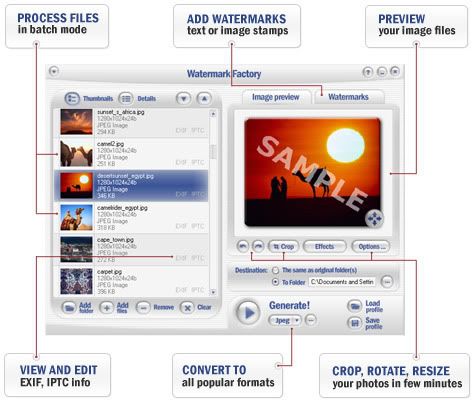
Watermark Factory is a powerful program that allows to solve a lot of
tasks. It contains wide variety of features to make completing the most
of digital photo related tasks more easier and faster. Bellow is the
list of features. Protect your copyrights using visible watermarks
Watermark Factory helps you protect images. You can add a visible
watermark to your digital images and photos. The watermark can be your
copyright or the URL of your site or your logo. Add date-stamp to your photos
Some digital cameras don't add date stamps to digital photo. This
product allows you to see the date and time when you snapped your
photos. Watermark Factory can add EXIF date or any custom date. Display EXIF or IPTC information
It is very useful to see EXIF or IPTC information for your digital
pictures. Watermark Factory provides detailed information about photos
(shutter speed, aperture, etc.). This information can be used as text
watermarks. Prepare digital pictures for Web
In order to
prepare your digital pictures for the web you'll need to do few things
with your images. At the very least the photos will need to be rotated,
cropped, and resized. Watermark Factory allows to do all these tasks in
the batch mode. Convert a lot of pictures to various formats
If you have a lot of pictures but in different formats, no problem!
Watermark Factory lets you to convert your files to any of the
following formats: BMP, GIF, JPG, TGA, PNG. Auto-rename a lot of pictures
Modern digital cameras save your pictures with own names. Auto-rename
feature allows renaming digital pictures using powerful templates-based
system with prefixes and suffixes. Add comments
Watermark
Factory helps to annotate pictures and you don't have to handle every
picture individually, instead you can add comments on dozens of photos
at the same time. Also this tool will be useful for everybody dealing with digital pictures because it contains a lot of features such as:
- One step to process large number of photos
- Batch renaming
- Batch resizing
- Batch converting
- Rotating
- Batch cropping: You can define a crop window for each picture and batch crop them.
- Control the output size while you are creating watermarks
- The built-in watermark gallery
- Auto file info: Stamp your photos with the filename
- Auto date: Stamp your photos with date picture taken
- Image effects
- Various graphic formats
- Easy view of EXIF and IPTC info
- NEW!: EXIF Information support Watermarking
- Text watermarks
-- text settings
--- font
--- color
--- align
--- adding special symbols
--- opacity
--- multi-line
-- effects
--- emboss/engrave
--- shadow
-- background for text watermarks
-- presets with text watermarks
-- positioning
--- manual (anchoring to any corner, edge or center)
--- tile feature
--- fit feature
-- transformation
--- any orientation for watermark
--- opacity changing
--- emboss/engrave feature
- Image watermarks
-- using any image (for example, logotype) as watermark
-- a lot of image formats, including formats alpha-chanel support (png, psd, tga, bmp32)
-- built-in watermark gallery
-- positioning
--- manual (anchoring to any corner, edge or center)
--- tile feature
--- fit feature
-- transformation
--- any orientation for watermark
--- opacity changing
--- emboss/engrave feature
Editing
- cropping
- rotate
- effects
- resize
A lot of input formats supported
BMP
JPEG
PSD
TGA
PNG
PCX
TIFF
GIF
Batch processing
Auto-Renaming
Sharpening
Saving profiles for projects
Saving lists of watermarks
User-Friendly interface
Output formats supported
JPG
GIF
PNG
BMP
TGA
EXIF/IPTC viewer
WYSIWYG interface (pronounced wiz-ee-wig) - What You See Is What You Get Code
http://hotfile.com/links/7993430/2a8531d/metallic-downloadz.blogspot.com_Watermark.Factory.v2.58.rar.html
| 





